Etched Legacy: Integrating a Vintage Font into Modern Design Workflows
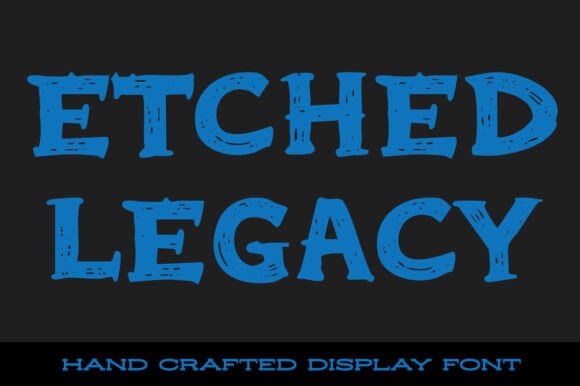
Etched Legacy is more than just a font—it's a design element that bridges the gap between traditional aesthetics and contemporary application. With its bold lines and intentional imperfections, it brings the weathered charm of classic tattoo artistry into digital and print projects. Whether you're working on branding materials, promotional posters, or web assets, Etched Legacy can serve as a stylistic anchor that communicates both strength and history.
Understanding Etched Legacy in the Design Ecosystem
Fonts are often overlooked in the broader design process, but they play a critical role in shaping the tone and message of a project. Etched Legacy stands apart with its vintage, distressed appearance, making it ideal for designers aiming to evoke a sense of permanence and storytelling. It fits well in creative processes where visual heritage is important—such as in packaging for artisanal products, event branding for music festivals, or even in logo design for niche businesses.
When to Use Etched Legacy in Your Creative Process
This font works best when introduced during the visual ideation phase. If you're sketching out a concept or mood board, Etched Legacy can help define the direction of your design language early on. It’s particularly effective when used for headlines or key visual elements rather than body text, due to its high contrast and decorative nature.
Consider integrating it into your workflow after you’ve established the foundational layout. It pairs well with clean sans-serif fonts for contrast, allowing you to maintain readability while still making a strong visual statement. For example, if you're designing a poster for a vintage motorcycle event, you might use Etched Legacy for the event title and a simple, modern font for the details like date and location.
Compatibility and Integration with Design Tools
Etched Legacy is compatible with most major design platforms, including Adobe Creative Suite, Figma, Sketch, and Canva. Its versatility allows for seamless integration whether you're working in vector illustration, layout design, or UI/UX environments. However, to get the most out of this font, it's important to understand how to manage its visual weight and texture within your project’s composition.
- Adobe Illustrator: Use the pathfinder tool to manipulate letterforms subtly for custom logo designs.
- Photoshop: Apply layer styles like inner shadows or texture overlays to enhance the distressed look.
- Canva: Combine with earth-toned backgrounds or leather textures to reinforce the vintage aesthetic.
Preparing Etched Legacy for Use
Before applying Etched Legacy in a live project, test it across different sizes and formats. Because of its distressed nature, some characters may lose clarity at smaller sizes or in low-resolution outputs. Always preview the font in both digital and print mockups to ensure legibility and consistency.
Additionally, consider using it in conjunction with complementary graphic assets—such as vintage borders, ink blots, or hand-drawn illustrations—to create a cohesive theme. This helps maintain a unified visual language without overwhelming the viewer.
Workflow Examples Using Etched Legacy
Let’s walk through a few practical scenarios where Etched Legacy enhances a design workflow:
- Branding for a Craft Brewery: Use Etched Legacy in the logo to evoke a sense of tradition and craftsmanship. Pair it with a minimalist icon and a clean secondary font for product labels and merchandise.
- Movie Poster Design: Integrate the font into the title treatment to create a dramatic, lasting impression. Combine with dark textures and high-contrast lighting for a cinematic feel.
- Merchandise for a Music Festival: Apply the font to t-shirts, posters, and social media assets to maintain a consistent and bold visual identity across platforms.
Optimizing Usability and Consistency
Because of its distinctive style, Etched Legacy should be used intentionally rather than liberally. Overuse can lead to visual fatigue or a cluttered design. To maintain consistency across multiple assets, create a style guide that outlines how and where the font should be applied. This is especially important for branding or multi-platform campaigns where uniformity is key.
Also, consider licensing options if you're using the font in commercial projects. Some distressed fonts have usage restrictions, so ensure that Etched Legacy is cleared for the intended application before finalizing your design.
Long-Term Use and Quality Control
When incorporating Etched Legacy into long-term projects, it's important to evaluate its relevance over time. While vintage styles have a certain timeless appeal, they can also fall out of favor depending on design trends. To mitigate this, use the font in ways that feel authentic rather than trend-driven. This means aligning its use with brand values or storytelling elements that remain consistent over time.
For digital assets, keep updated backups of the font files along with your project files to avoid missing fonts in future edits. If you're working in a team environment, ensure all collaborators have access to the same font versions to maintain design integrity across revisions.
Enhancing the Design Process with Etched Legacy
Incorporating Etched Legacy into your design process isn’t just about choosing a font—it’s about selecting a visual voice that supports your message. It adds character and authenticity, especially in projects that aim to connect with audiences on an emotional or nostalgic level. By understanding its strengths and limitations, you can use it strategically to enhance communication without sacrificing clarity or professionalism.
Ultimately, the goal is to make Etched Legacy a functional part of your toolkit, not just a stylistic novelty. When used with intention, it can elevate your work and leave a lasting impression—just like the inked designs that inspired it.